
Enable AFib History For More Accurate Results
Last updated: October 29, 2025
What is AFib on Apple Watch?
Atrial Fibrillation (AFib) monitoring on Apple Watch tracks irregular heart rhythms to help you monitor heart health when chambers are not beating in sync.
Key Features:
- Continuous monitoring of heart rhythm patterns
- Weekly percentage estimates of time spent in AFib
- Detailed tracking through the Health app
- Integration with other health metrics
Why AFib History Benefits Livity Users
AFib History improves Livity's health metrics by increasing heart‑rate sampling. When enabled, Apple Watch collects more frequent samples into Health, powering Livity's core features:
- Recovery Score calculations
- Body Battery measurements
- Strain level assessments
- Stress level monitoring
More samples directly improve algorithm accuracy for more precise insights and performance metrics.
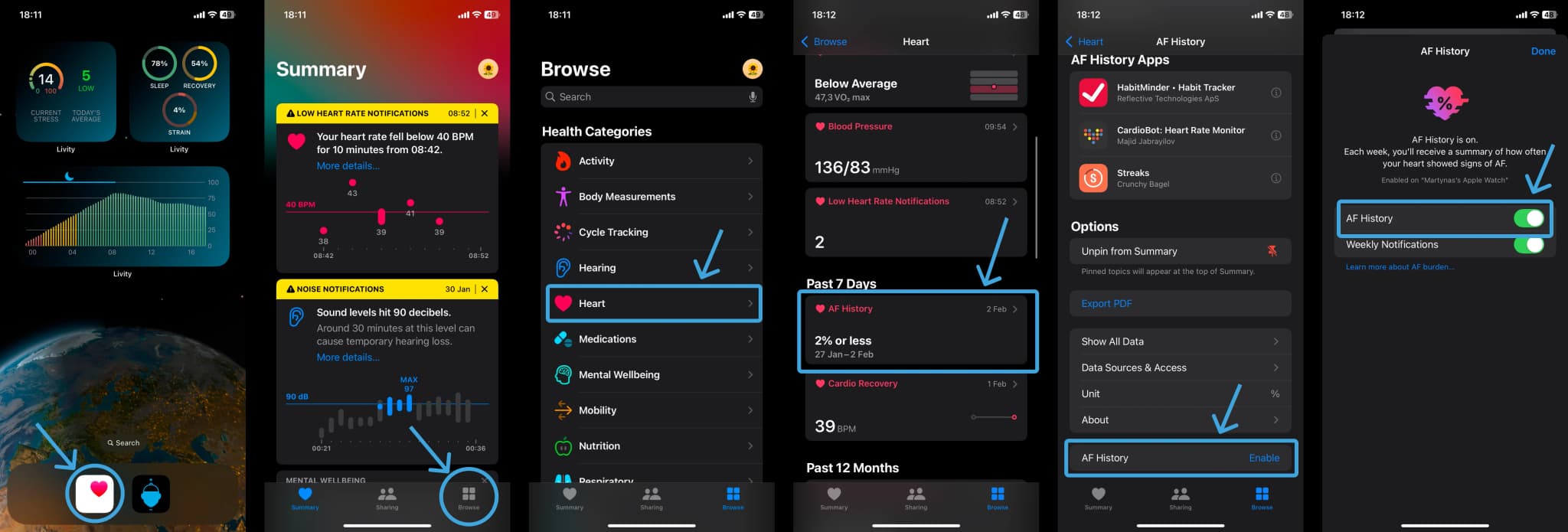
How to Set Up AFib History
Setting up AFib History on Apple Watch is straightforward and takes just a few minutes.
Step‑by‑Step Setup Guide:
Launch the Health App
- • Open the Health app on your iPhone
- • Navigate to the Browse tab
- • Select the Heart section
Initialize AFib History
- • Tap on “AFib History”
- • Select “Set Up” then “Get Started”
Complete Required Information
- • Enter your birth date
- • Confirm your AFib diagnosis from a physician
- • Review and acknowledge feature information
Enable Necessary Settings
- • Ensure Heart Rate monitoring is active
- • Turn on Wrist Detection
- • Verify your device meets the minimum requirements
Important Considerations
Battery Impact
AFib monitoring is disabled in Low Power Mode to conserve battery life.
Medical Device Disclaimer
This feature is not a replacement for medical devices and should not be used for diagnostic purposes.
Detection Limitations
Some AFib episodes may be missed; accuracy depends on proper watch fit and wear time.